







 By Rebekah Carter
Quick Answer: Shopify’s $1/month for 3 months trial gives you full access to any plan — Basic, Grow, or Advanced — for just $1 per month.
That means you get 90 days to build, test, and launch a real store with zero limitations, before paying the regular monthly price ($39, $105, or $399). It’s not a free trial, but it’s the lowest-cost way to get started with a live, sellable store.
When I first saw Shopify’s “$1 for 3 months” offer, I thought it was too good to be true.
Was this a real deal or just another gimmick to get you locked into something expensive?
After testing it myself, digging through Shopify’s policies, and comparing it to other platforms, I can tell you exactly what you’re getting — and what to avoid.
This guide breaks it down clearly: what the offer includes, how it compares to the old free trial, how it stacks up against other platforms, and who it’s actually best for.
What Is Shopify’s $1 Trial – And What Do You Actually Get?
So here’s how it works: instead of a 14-day free trial, Shopify now gives you full access to any plan for $1/month for 3 months.
That means you’re only paying $3 total over the 90 days — and during that time, you can run your store, sell products, and access every feature that comes with your chosen plan.
Here’s exactly what’s included:
- Full access to all features (you pick Basic, Shopify, or Advanced plan)
- You can sell real products immediately
- You can install apps, use premium themes, and access reports
- Live payment gateway access (Stripe, PayPal, etc.)
- Storefront is live and visible to customers
- You can cancel any time during the 3 months without penalty
You’re not locked into a yearly plan unless you manually select one.
But here’s the key detail most people miss: after 3 months, your account automatically switches to full pricing unless you cancel or downgrade.
Verdict: This is real value, especially if you’re serious about launching. But be ready to set a reminder before your renewal date.
How to Get the Shopify $1/Month for 3 Months Trial — Step-by-Step
Signing up for Shopify’s $1/month deal only takes a few minutes.
But if you’re new to the platform or you’ve never built an online store before, here’s exactly how to do it without messing anything up.
Step 1: Go to the Official Trial Page
Use this direct link to access the $1/month trial:
Don’t Google it. Shopify shows different offers depending on your location, device, or cookies. That link guarantees the 3-month offer.
Step 2: Enter Your Email and Create a Shopify Account
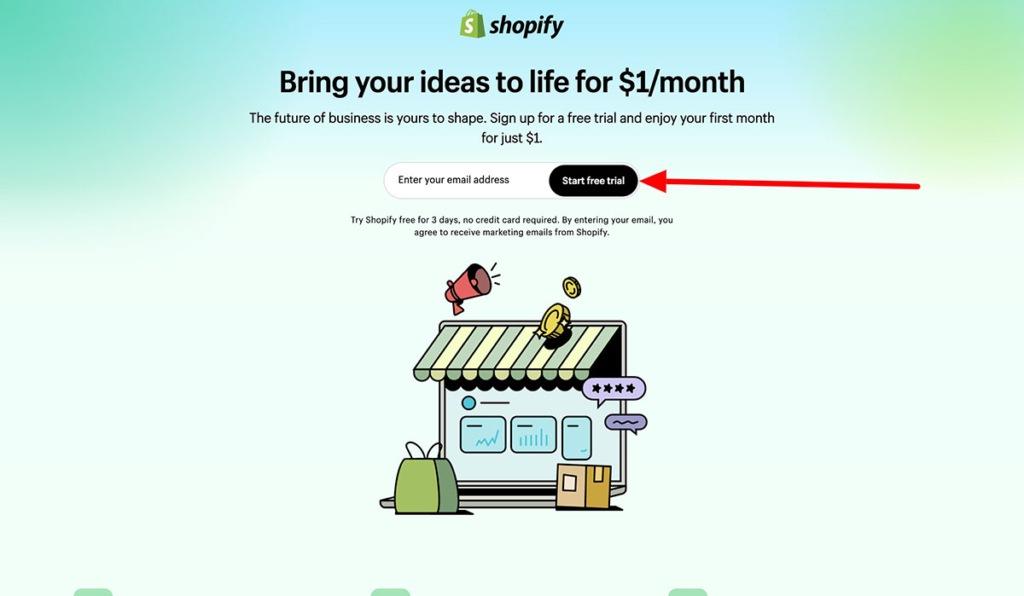
- Type in your email address
- Click “Start free trial”
- Choose a password and store name
- You’ll be redirected to your Shopify dashboard
Pro tip: Don’t stress the store name — you can change it later.
Step 3: Answer a Few Setup Questions
Shopify asks a few onboarding questions like:
- Are you already selling?
- What do you plan to sell?
- Where do you want to sell (e.g. social media, online store, etc.)?
These help personalise your dashboard, but they won’t impact pricing or features.
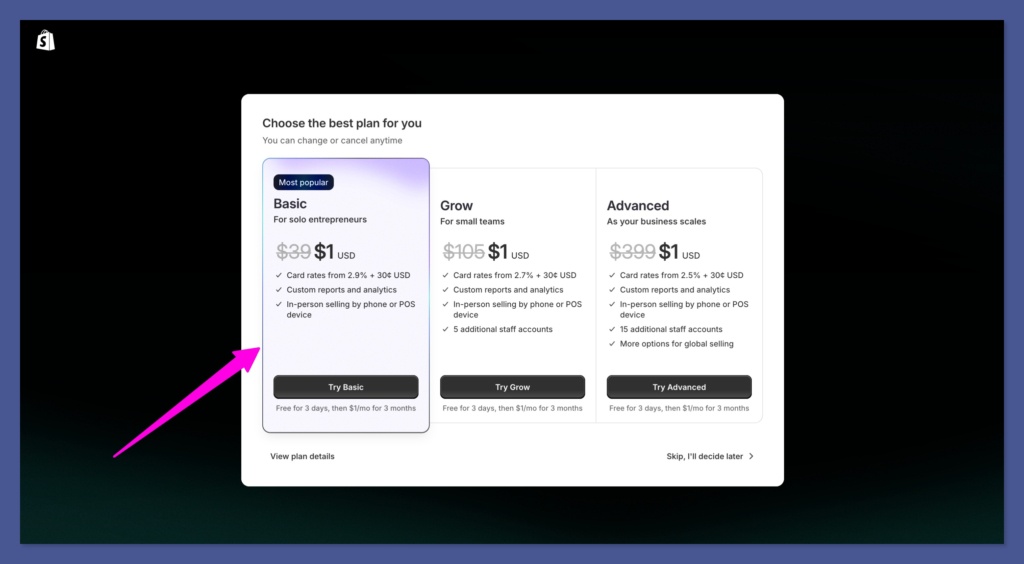
Step 4: Choose a Plan (This Unlocks the Trial)
Here’s something most people miss: You don’t have to choose a plan right away.
You actually get 3 days of free access without picking a plan or entering payment info.
That means:
- You can explore the dashboard
- Start building your homepage
- Install themes
- Check out the app store
- Add products and collections
When you’re ready — within those 3 days — you’ll choose a plan to unlock the $1/month for 3 months deal.
Here are the plan options (in USD):
| Plan | Regular Monthly Cost (after trial) |
|---|---|
| Basic | $39/month |
| Shopify | $105/month |
| Advanced | $399/month |
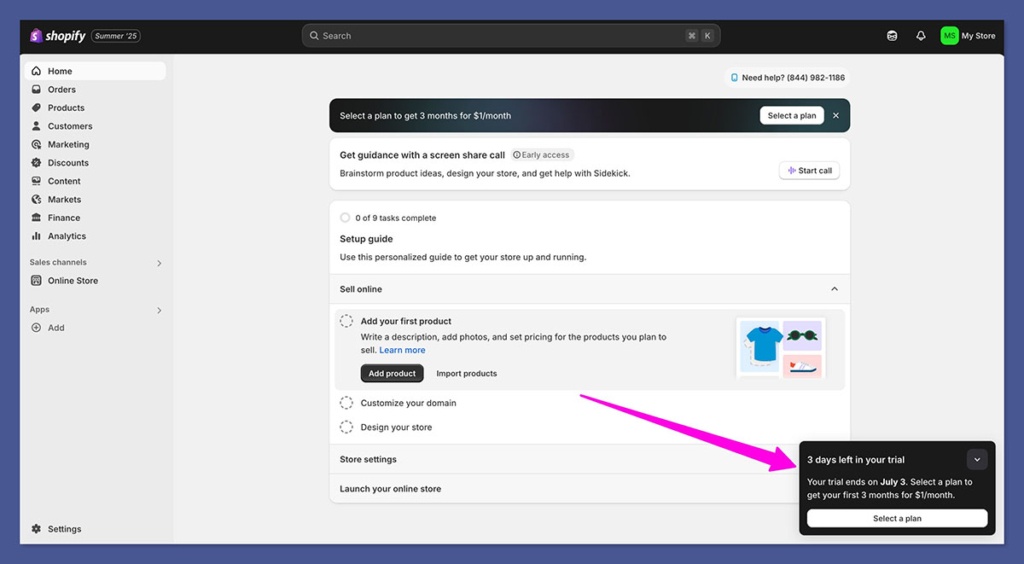
Once you choose, you’ll see a clear message confirming:
“$1 for your first 3 months.”
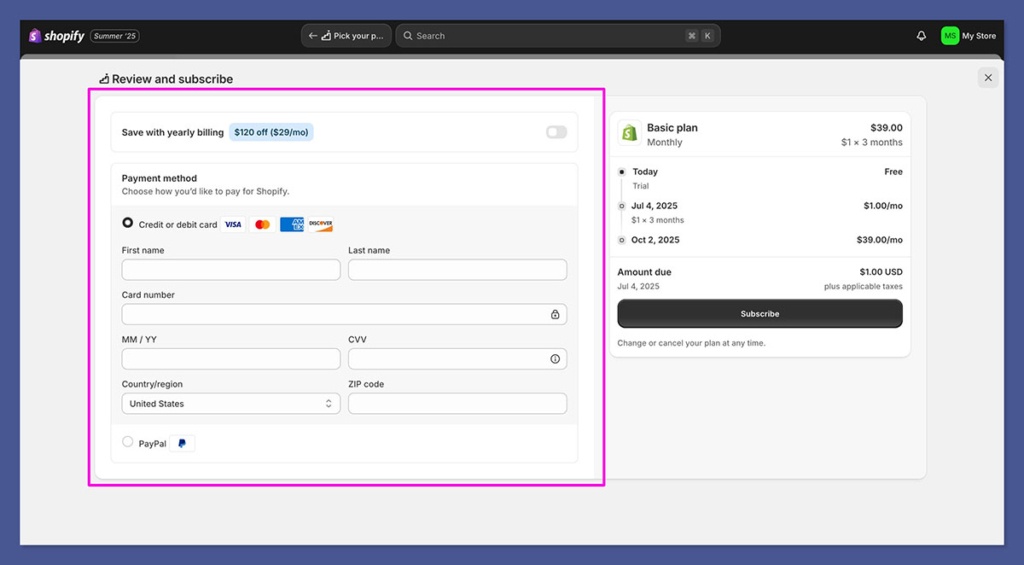
Important: You’re only charged $1/month during the trial — not the full price. The regular rate kicks in after the 90 days unless you cancel. — unless you stay past the trial without cancelling.
Step 5: Add Your Payment Method
To activate the trial, you need to enter a valid credit or debit card.
That’s how Shopify bills the $1 each month — and how it will charge you later if you continue.
No card = no trial. There’s no bypass here.
Step 6: You’re In — Start Building Your Store
After payment, you’ll land inside your Shopify dashboard.
From here, you can:
- Choose a free or paid theme
- Add products and descriptions
- Connect a custom domain
- Set up payment gateways (Stripe, PayPal, Shop Pay)
- Install apps for upsells, reviews, analytics, and email
- Publish your store and start selling
You’ve got three full months before Shopify bills you the full monthly price.
Make those days count.
Verdict: The whole setup takes under 10 minutes.
And for $3 total, you get real, unrestricted access to launch a live store and make sales.
Just don’t forget — Shopify will auto-renew at full price after the 3-month trial. Set a reminder so you’re not caught off guard.
How It Compares to Shopify’s Old Free Trial
If you used Shopify before 2023, you might remember the 14-day free trial — no credit card, no billing, no fuss.
Here’s a quick side-by-side breakdown of the new vs old:
| Feature | Old 14-Day Free Trial | New $1/Month Trial |
|---|---|---|
| Duration | 14 days | 90 days |
| Cost | Free | $3 total |
| Access to Premium Features | Limited | Full Access |
| Payment Gateway | No | Yes |
| Store Can Go Live | No | Yes |
| Credit Card Needed | No | Yes |
The old trial gave you just enough time to play around with themes — but not enough to actually launch or test a store properly.
With the 3-month version, I was able to test my product pages, install upsell apps, link Stripe, and even run a TikTok ad — all before paying real monthly fees.
Verdict: The old free trial was safer for browsers. The new one is better for action takers.
Shopify vs Competitors – How This Trial Stacks Up
Now let’s talk about alternatives.
Plenty of other platforms offer trials, but few go as deep as Shopify’s current offer. Here’s a quick overview:
| Platform | Trial | Cost After Trial | Real Store Access During Trial? |
|---|---|---|---|
| Shopify | 3 months for $1/month | £19/month (Basic) | Yes |
| WooCommerce | Free forever (self-hosted) | Varies by hosting | Yes |
| Wix eCommerce | 14 days | £20/month | Partially |
| BigCommerce | 15 days free | £22+/month | Yes |
| Squarespace | 14 days | £21/month | Limited |
| Ecwid | Free plan (limited) | From £14/month | Yes (limited features) |
I’ve tested most of these personally. The issue with most free plans? You hit a wall fast — no custom domain, no payment gateway, no upsell features.
With Shopify’s $1 trial, I had zero limitations. That’s what made it different.
Verdict: If you want to get something launched and tested for real, Shopify’s $1 deal has more value than any other freebie I’ve tried.
Who This Trial Is Perfect For
This isn’t for everyone — and that’s fine.
But based on my experience and the Shopify partner data I’ve seen, here’s who benefits the most from this offer:
Best use cases:
- Dropshippers: Test Aliexpress or CJ dropshipping products with a 90-day runway
- Print-on-demand sellers: Try Printful or Gelato integration without any app limits
- Coaches and course sellers: Use Shopify for digital products with apps like SendOwl or Kajabi
- TikTok or Instagram marketers: Test ad creatives and build a store on the side
- Affiliate marketers: Set up example stores to boost Shopify commissions
If you’re still “thinking” about starting a business, this might not be for you.
But if you’ve got a product or niche idea ready to go, $3 for 3 months is one of the lowest-risk ways to test your funnel.
Verdict: It’s a perfect offer for action takers — not ideal for tire-kickers.
What Happens After 3 Months?
This is where people get tripped up.
After your $1/month trial ends, Shopify automatically upgrades you to the full price of your selected plan:
| Plan | Monthly Cost (after trial) | Features |
|---|---|---|
| Basic | £19/month | All core features, up to 1 staff account |
| Shopify | £49/month | Better reporting, more staff, lower fees |
| Advanced | £259/month | Advanced reporting, shipping discounts, etc. |
If you forget to cancel or downgrade before your renewal date, you’ll be billed automatically.
I recommend setting a calendar reminder or using a free tool like FollowUpThen to nudge you before billing hits.
Also: no refunds. Shopify’s terms are strict here. Once it charges your card, you’re in.
Verdict: Great trial — but don’t sleep on the 90-day timer. Cancel or commit.
What You Can Do During the Trial (Step-By-Step)
Here’s how I used my 3 months strategically — without wasting a day:
Month 1: Setup & Planning
- Picked a niche and product using trends on TikTok
- Installed a clean premium theme (free from Shopify)
- Connected Printful for print-on-demand t-shirts
- Installed apps: ReConvert (upsells), Judge.me (reviews), Klaviyo (email)
Month 2: Testing & Building
- Built out 10 product pages and 5 collections
- Connected Stripe and PayPal
- Wrote product descriptions with ChatGPT + Grammarly
- Launched a TikTok organic page + tested ads
Month 3: Selling & Optimising
- Got 6 sales from organic traffic + 2 from TikTok paid
- Set up email flows: welcome, abandoned cart, post-purchase
- Started tracking conversions with GA4 and Meta Pixel
- Prepared to switch to the Basic plan at full price (£19/month)
Verdict: If you plan your 90 days well, you can go from idea to sales — even if you’re brand new.
Final Thoughts: Should You Use the Shopify $1 Trial?
If you’re serious about launching an online store, this is one of the lowest-risk offers out there.
You get three full months to build your site, add products, install apps, test marketing, and even make real sales — all for just $1/month.
It’s not some limited demo. You get the real thing.
Just know this:
- You’ll need a card to start
- You’ll be billed the full plan price after 3 months if you don’t cancel
- And the time will fly by — so have a plan before you start
If you’re ready to move and want to test your idea without burning cash, it’s honestly a no-brainer.